What Is SketchBubble AI?
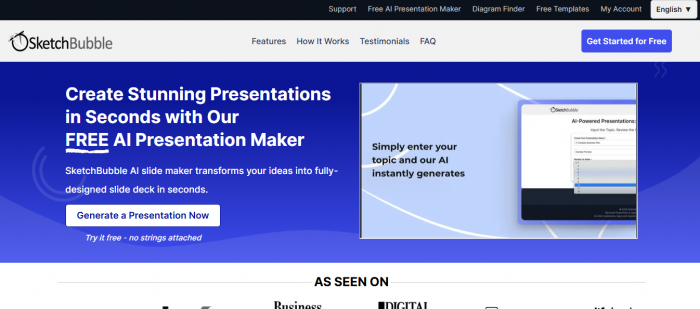
SketchBubble AI is an AI-powered presentation maker that generates professional, customizable slide decks in seconds. Unlike traditional template libraries, it uses artificial intelligence to structure content, suggest visuals, and design slides, saving hours of manual work. Whether for business, education, or personal use, it helps anyone create polished decks without design expertise.
How It Works
- Input Your Prompt – Provide a topic, keywords, or outline.
- AI Drafts an Outline – Review and refine the suggested structure.
- Generate Slides – AI produces a complete slide deck instantly.
- Customize – Edit layouts, visuals, fonts, and branding.
- Export – Download in PowerPoint (.pptx) or open in Google Slides.
Key Features
- Innovative, Human-Designed Templates Powered by AI
The tool blends designer-made templates with AI enhancement to ensure clarity, readability, and professional aesthetics tailored to the context. - Automated Content & Visual Suggestions
From headlines and layouts to visuals and infographics - the AI understands your prompt’s tone (e.g., marketing vs. educational) and suggests accordingly. - Complete Customization & Branding
You can adjust every element—colors, fonts, icons, layout—to align with your brand or aesthetic preferences. - Multi-Platform Export Compatibility
Presentations work seamlessly in both PowerPoint and Google Slides. - Multilingual Support
Generate presentations in languages beyond English - such as German, French, Spanish, and more. - Free to Use
SketchBubble AI comes with no cost, offering powerful features at zero charge.
Pricing
SketchBubble AI operates on a credit-based model:
- Free Plan: 500 credits to generate and download presentations.
- Paid Plans: Starting at $14.95/month, offering more credits, downloads, and advanced features for professionals.
This makes it flexible for both occasional users (students, small teams) and heavy users (business professionals, trainers, consultants).
Use Cases & Who It’s Best For
- Business Leaders – Investor pitches, quarterly updates, sales decks.
- Educators & Trainers – Lesson plans, workshops, e-learning materials.
- Students – Assignments, project reports, thesis defenses.
- Consultants & Entrepreneurs – Market analysis, client presentations, strategy decks.
Pros & Strengths
| Strength | Insight |
| Speed & Efficiency | Create polished presentations within seconds - great for tight timelines. |
| User-Friendly Interface | Minimal learning curve - even novices can use it effectively. |
| Design Flexibility | Maintain brand consistency and tweak designs with ease. |
| Cost-Free | Provides advanced features and export options at no cost. |
| Tailored AI Output | Context-aware suggestions enhance relevance and engagement. |
Considerations & Limitations
- Level of AI Sophistication
Compared to industry-leading tools like Gamma, SketchBubble AI’s AI capabilities are robust but rated as intermediate rather than “advanced.” - Online Collaboration
Unlike some AI-native platforms, SketchBubble AI relies on external collaboration via PowerPoint or Google Slides - not in-app real-time editing. - Data Privacy
Standard generative AI concerns apply; users should ensure confidentiality as per platform policies.
How It Compares to Alternatives
Vs. Presentations.ai
- SketchBubble AI: Free, extensive customization, broad template library, export-friendly.
- Presentations.ai: More limited templates, less design flexibility, may require paid tiers.
Vs. Beautiful.ai
- SketchBubble AI: More templates, branding control, export formats, free access.
- Beautiful.ai: Sleek interface, but limited creative freedom and fewer industry-specific templates.
Vs. Gamma AI
- SketchBubble AI: Strong on customization, branding, export—but AI is less advanced.
- Gamma AI: Top-tier AI generation, immersive format; but moderate learning curve, less branding flexibility.
User Feedback Highlights
On Product Hunt, users praise SketchBubble AI as a "time-saver" and ideal for quick client decks or college projects:
“SketchBubble AI gives me a great starting point… client-ready in under 30 minutes.”
“Huge time-saver for my college projects!... ready-to-edit presentation in seconds.”
Final Verdict
SketchBubble AI is an excellent choice for professionals, educators, and students who want fast, free (with credits), and customizable presentations. While its AI sophistication may not match top-tier competitors like Gamma, its affordability, branding flexibility, and PowerPoint compatibility make it one of the most practical AI presentation makers today.
FAQs
Q1. Is SketchBubble AI free?
Yes. You start with 500 free credits to generate and download presentations.
Q2. What happens when I run out of credits?
You’ll need to upgrade to a paid plan (starting at $14.95/month) for more credits and downloads.
Q3. Can I use it with PowerPoint and Google Slides?
Yes, all AI-generated decks can be downloaded in .pptx or opened in Google Slides.
Q4. Does it support other languages besides English?
Yes, you can create slides in multiple languages such as Spanish, French, German, and more.
Q5. Is there a limit on the number of slides per deck?
AI usually generates a structured deck of 8 - 15 slides, but you can add or edit slides as needed.
Q6. Can teams collaborate inside the tool?
Not directly - collaboration happens in PowerPoint or Google Slides after export.
Q7. Who benefits most from SketchBubble AI?
Educators, students, consultants, entrepreneurs, and business professionals who need quick, polished presentations.
Post Comment
Be the first to post comment!