Remember when building a slide deck devoured half your workday? That era is fading fast. AI-powered tools now generate roughly 47 million business presentations every month, up from 11 million in 2024, and automated slide building has shifted from novelty to everyday workflow. Six in ten large companies already lean on an AI assistant inside PowerPoint, Google Slides, or a web app to turn out client pitches, board updates, and training decks in minutes. Teams that have made the switch report cutting prep time by as much as 95 percent, freeing them to focus on the story instead of nudging text boxes.
But “AI presentation tool” has become a crowded label, and not every product means the same thing. The category that matters here pairs a large language model with a slide-layout engine, so the software writes the copy and designs the deck in a single pass. The result is a living, editable presentation—usually in PowerPoint, Google Slides, or a web canvas—rather than a static image or a lone headline. Understanding how today’s leading tools differ is the first step to choosing one that actually fits the way your team works.
Assistants that live inside your existing slides
For many teams, the biggest barrier to adopting AI isn’t capability—it’s disruption. People know their templates and shortcuts, and nobody wants to retrain a whole department on a new platform. That’s why the fastest-growing approach keeps the AI inside the tools you already use.
The clearest example is the Plus AI presentation maker, which adds a smart sidebar to Google Slides and PowerPoint. You type a prompt like “Five-slide overview of our Q1 sales,” and a draft appears in seconds; upload an old PDF or Word document, and it rebuilds the material into fresh, on-brand slides. Because you never leave Slides or PowerPoint, every native design tool stays at your fingertips, and edits—rewriting a clunky bullet, swapping a layout—happen without regenerating the whole deck. Enterprise touches like SOC 2 Type II compliance and single sign-on make it an easy sell to IT, which is why it tends to suit consulting firms, sales teams, and project managers who build decks every week.
Microsoft and Google offer their own in-app helpers. Microsoft 365 Copilot builds slides directly from your Word files, Excel tables, and Teams chats, pulling live figures into branded charts without a single copy-paste—ideal for organizations standardized on PowerPoint. Google’s Gemini assistant inside Slides does much the same for Workspace teams, spinning a Google Doc into a multi-slide deck and generating license-safe visuals on the canvas. Both keep data inside their respective security tenants, though each requires a separate subscription.

When design and content take the lead
Staying in your current editor isn’t everyone’s priority. Sometimes the deck itself has to look exceptional, and a design-first web tool earns its place.
Beautiful.ai, for instance, treats layout as something the software should handle for you: its smart templates rebalance spacing, font sizes, and alignment automatically as you add or cut text, so a deck stays polished without manual fiddling. Canva approaches the same goal from a creative angle, generating several fully styled decks from a single topic and backing them with an enormous library of images, icons, and brand controls. Teams that value collaboration often reach for Pitch, which pairs sleek templates with real-time editing and live feedback rooms, while newer entrants such as Alai offer multiple AI-generated layout options per slide so you choose a direction rather than accept one guess.
A different need—turning long, dense material into something readable—has its own answer. Gamma converts a pasted outline or article into a vertical, scrollable deck that reads like a story on any screen, complete with auto-generated charts and collapsible sections. It is less about stage presence and more about clear, skimmable comprehension for white papers, proposals, and internal strategy documents.
How to choose the right tool for your team
With so many capable options, the decision comes down to a few practical questions rather than a single “best” answer.
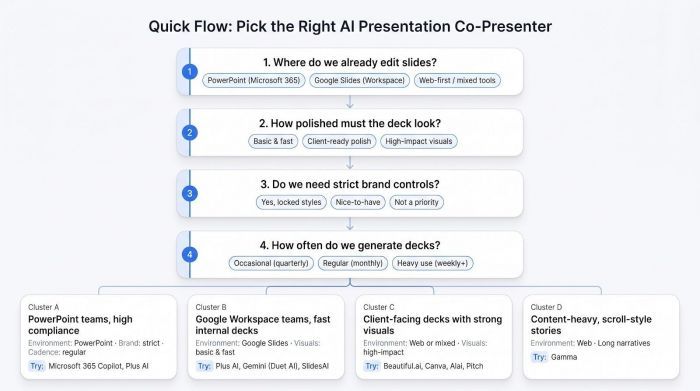
Start with your environment. If your company lives in PowerPoint, an in-app assistant such as Copilot or Plus AI removes friction immediately; Google-centric teams gain the same speed from Plus AI or Gemini. Next, weigh visual ambition: a high-stakes pitch may justify the polish of Canva or Beautiful.ai, while an internal status update rarely needs more than clean, data-driven slides. Then consider brand governance—enterprises that guard their color codes will want the locked style libraries that Plus AI and Beautiful.ai team plans provide. Finally, match the cost to your cadence. If you build one deck a quarter, a free tier or trial may be plenty; if you ship client presentations weekly, a paid plan that saves four hours per deck pays for itself almost immediately.
What’s next for AI presentations
Generative slides are only the opening chapter. Vendors are already testing voice-first creation, where you describe a deck aloud and watch slides appear with speaker notes attached. More ambitious are agentic builders that chain tasks together—reading a data room, gathering research, drafting a narrative, and delivering a finished deck with little human input until final approval.
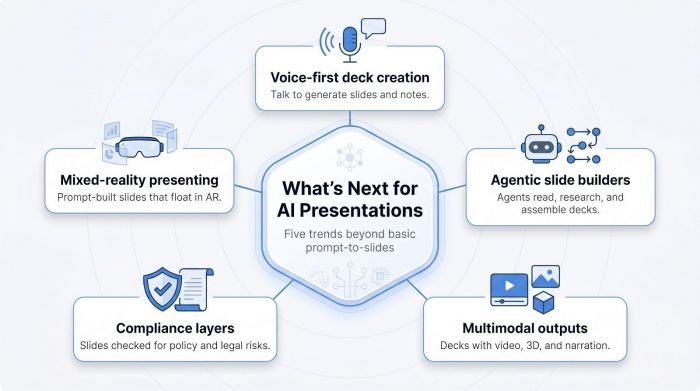
Expect richer outputs, too: auto-generated video clips, AI-voiced narration, and interactive elements that turn a deck into a self-running explainer. As adoption spreads through regulated industries, compliance layers will scan each slide for policy issues before export, and as AR headsets mature, “slides” may eventually float in room space, arranged by the same prompt you’d use today.
The bottom line
AI presentation tools have crossed from experiment to everyday infrastructure, and the gap between them now lies in fit rather than raw capability. Map where your team already works, how polished your decks must be, and how often you build them, and the right tool tends to reveal itself. Whether you keep the AI tucked into your familiar editor or lean on a design-first platform, the payoff is the same: less time wrestling with text boxes, and more time telling a story worth presenting.
Post Comment
Be the first to post comment!





